In this section, we add a clickable option to the right-click menu of websheet. The following example adds a "Custom Right-Click Menu" option.
¶ I. Creating the Menu
First, create the div that you want to display and bind your custom interaction events. The following example creates it dynamically. The code is as follows:
let yourDiv = document.createElement('div');
yourDiv.id = 'youDiv';
yourDiv.innerText = 'Custom Right-Click Menu';
yourDiv.className = 'fiss-rightMenu-Item'; // CSS settings for mouse hover
yourDiv.addEventListener('click', function (e) {
  let range = activeSheet.ActiveRange();
  let cell = activeSheet.GetCellValue(range);
  console.log(cell.value); // Print the value of the active cell
});
We create a dynamic div using document.createElement and set its id, display text, and CSS properties. We then add a click event to this div to get the content of the active cell and print it.
¶ II. Registering the Menu
Once you have defined the display menu div, you can register it to websheet using wsheet.AddRightMenu.
wsheet.AddRightMenuSegment(); // Add a separator to the right-click menu
wsheet.AddRightMenu(yourDiv);
You can also add a predefined menu separator using wsheet.AddRightMenuSegment.
wsheet.AddRightMenuSegment(); // Add a separator to the right-click menu
¶ III. Effect and Complete Code
¶ 3.1 Effect
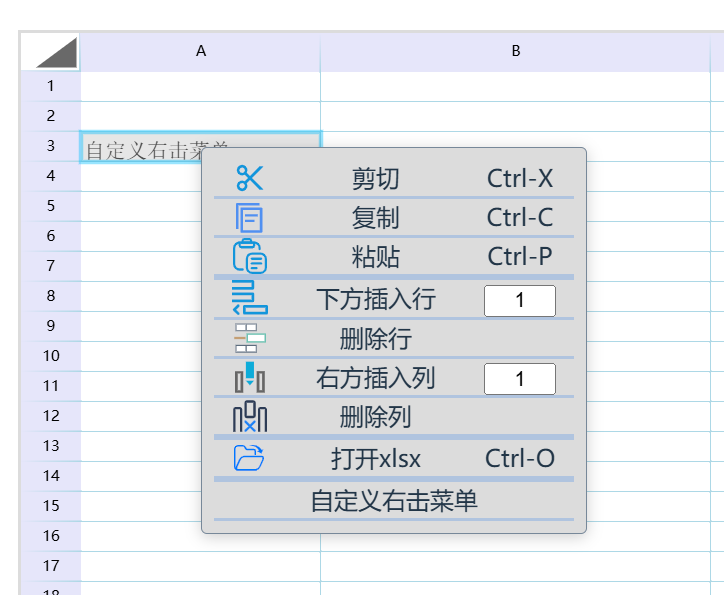
¶ 3.2 Complete Code
let wsheet = new websheet('yourID', yourElement);
/**
 * Step 1: Get the active sheet
 */
let activeSheet = wsheet.ActiveSheet();
activeSheet.SetCellValue('A3', 'Custom Right-Click Menu');
/**
 * Step 2: Define your own display div and add it to the right-click menu
 */
wsheet.AddRightMenuSegment(); // Add a separator to the right-click menu
let yourDiv = document.createElement('div');
yourDiv.id = 'youDiv';
yourDiv.innerText = 'Custom Right-Click Menu';
yourDiv.className = 'fiss-rightMenu-Item';
yourDiv.addEventListener('click', function (e) {
  let range = activeSheet.ActiveRange();
  let cell = activeSheet.GetCellValue(range);
  console.log(cell.value); // Print the value of the active cell
});
wsheet.AddRightMenu(yourDiv);
/**
 * Step 3: Redraw the table
 */
activeSheet.setColWidth(1, 160);
activeSheet.setColWidth(2, 260);
activeSheet.setColWidth(3, 160);
activeSheet.setColWidth(4, 160);
activeSheet.setColWidth(5, 160);
wsheet.BuildSheet();
wsheet.Draw();